
Platform · built for technical teams
Watch the agent build
Every run streams step-by-step — analyzing, editing, building, committing — so you see the work happen, not an opaque spinner.
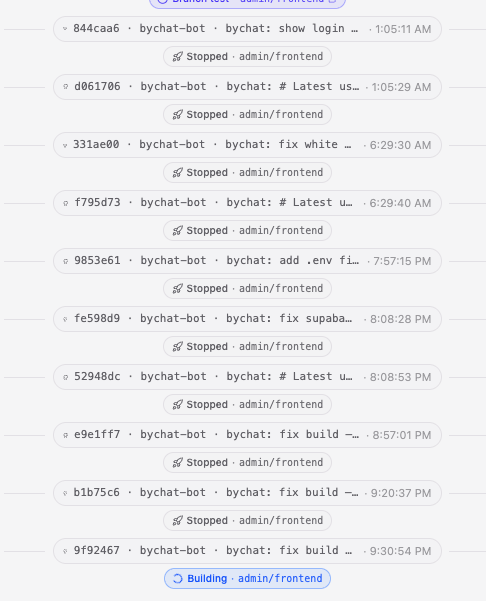
When you send a message, bychat's agent runs in the open. A live progress envelope shows each step as it happens — "step 2 of 5", a spinning indicator on the in-flight task, green checks on finished ones — and every change it makes lands as a real commit on your repo. If a run is interrupted you can Continue, Edit, or hit "Fix this" on a fixable failure, instead of starting over.
This is built for engineers who want to trust the output. Because each message becomes a commit linked to the turn that produced it, the whole build history is one reviewable timeline — diff it, revert it, branch from it. No black box: the same transparency you expect from CI, applied to AI edits.
How it works
Send a message
Describe the change in plain language; the agent picks it up and starts a run.
Watch each step
Analyze → edit → build → commit streams live, step by step, with status on each.
Review the commits
Every change is a real commit linked to your message — diff, revert, or keep going.
Example prompts
Copy one to start, or write your own — bychat takes it from there.
Add authentication with email magic links and protect the dashboard route.
Refactor the API layer into a typed client and update all callers.
Add a Postgres migration for a `projects` table and wire up CRUD endpoints.
Set up CI to run the test suite on every commit.
Frequently asked questions
Can I see what the agent changed?
Yes. Every step streams live and every change is committed to your repo, so you can read the diff for each turn just like a normal pull request.
What happens if a run fails midway?
The run is marked interrupted or failed and you get Continue / Edit actions — and a "Fix this" action for fixable code or build errors — rather than losing your place.
Is the work saved if I close the tab?
Yes. Runs commit to your repo as they go, so progress is durable. On reconnect the chat reattaches to the running or finished run.
Do commits link back to my messages?
Yes. Each commit is linked to the message that triggered it, so the feed reads as one timeline of conversation and code together.